


Running an LLC lookup in Michigan is one of the simplest ways to verify that a business is real, active, and properly registered in the Great Lakes State. Whether you’re checking a company before signing a contract, confirming your own LLC’s compliance, or researching name availability before forming a business, Michigan’s official database gives you the answers you need in just a few minutes.
Ready to learn more? Check out the guide below. In just a few minutes, you’ll learn how to search Michigan’s LLC records, how to read and interpret the results, and what to do next based on what you find, all using the state’s official business entity system.
Why you might need an LLC lookup in Michigan
People use Michigan’s LLC lookup tool for a few key reasons. Most often, they want to:
- Confirm an LLC is real and active in Michigan before paying invoices, signing contracts, or opening accounts
- Review the owner, manager, or governing information when it’s available through Michigan filings
- Check name availability before forming a new Michigan LLC and avoid conflicts with existing businesses
Before you learn the steps, it helps to understand exactly what an LLC lookup is, and what it can tell you.
What is an LLC lookup?
An LLC lookup is a search of Michigan’s official business entity database, which is maintained by the state. It allows anyone to view a company’s legal registration record, making it the most reliable public source for confirming whether an LLC exists and is compliant in Michigan. While an LLC lookup focuses specifically on limited liability companies, you can also perform a Michigan business entity search to check broader name availability or review corporations, nonprofits, and other entity types registered in the state.
What can an LLC lookup help you confirm?
An record of an LLC in Michigan typically allows you to verify:
- Whether an LLC is active or inactive under Michigan’s status terms.
- Whether an LLC is in good standing with state filing requirements (when shown).
- The LLC’s registered agent and official addresses.
- The LLC’s formation date and jurisdiction or state.
- The company’s filing history, including PDFs that may list managers, members, organizers, or owners, the registered agent and official addresses.
Please note that when you run an LLC search using the MIBusiness Registry Portal, you may not find ownership information. Because Michigan prioritizes privacy, owners aren’t typically listed in LLC filings, though you should be able to find information about the LLC’s registered agent and organizers. Manager and member details, if the LLC has multiple members, will be displayed within the linked filing documents.
What you can find in a Michigan LLC lookup
When you open an LLC record in Michigan’s system, you’ll typically see:
- The legal business name
- Entity or identification number and entity type
- Status: whether the LLC is active, inactive, or dissolved
- Accounts receivable standing: whether the LLC is in good or not good standing
- The accounts receivable due date
- Formation date and state or jurisdiction
- Registered agent name and registered office address
- Names and addresses for president, secretary, director, treasurer, or other members, if applicable
- Filing history with downloadable PDFs
Conducting an LLC search in Michigan: step-by-step guide with tips
Michigan’s search system is straightforward, but a few small tips can help you get accurate results faster. Read below for a step-by-step guide.
1. Go to the official Michigan LLC search portal
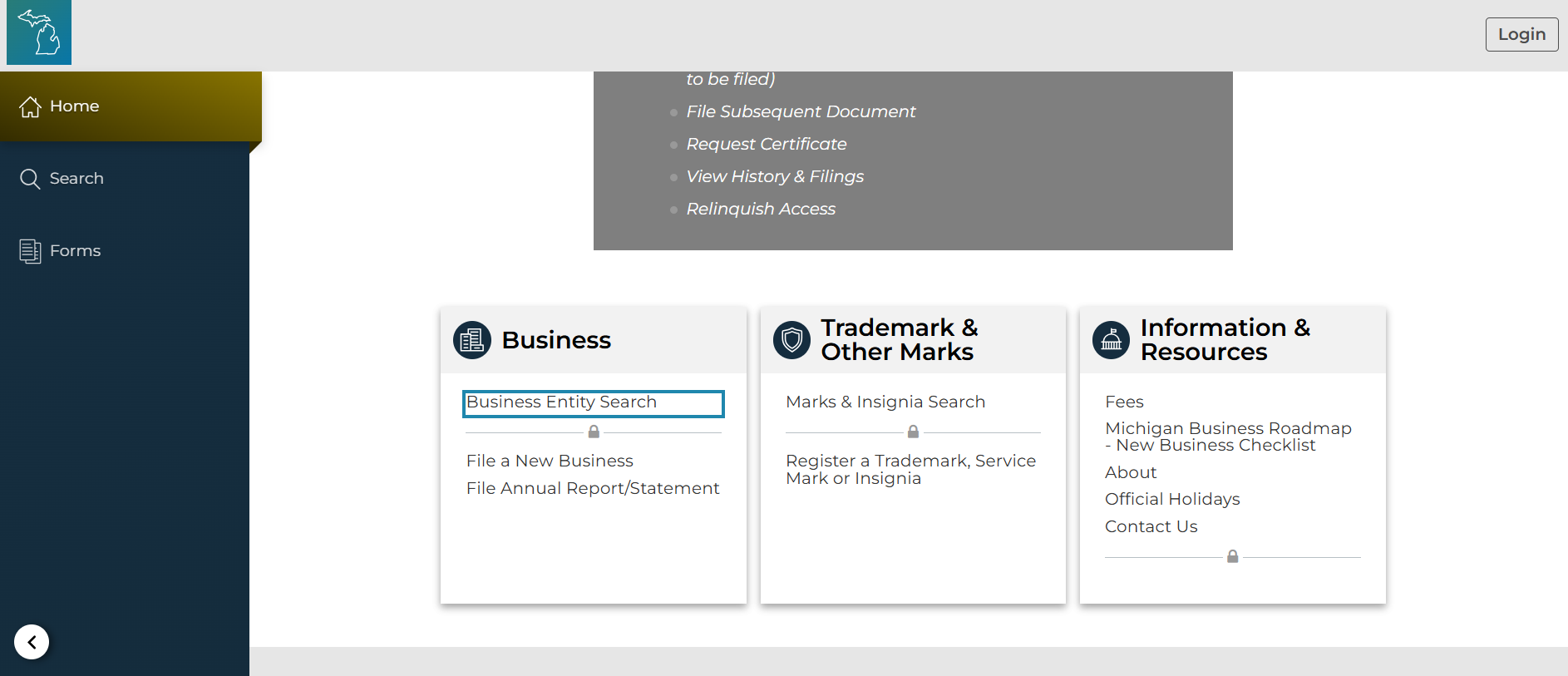
Go to the MIBusiness Registry Portal and scroll down to the Business Entity Search. You won’t need to create an account or log in, but if you’ve never used the search before, you may need to complete a CAPTCHA.
2. Choose the best search method
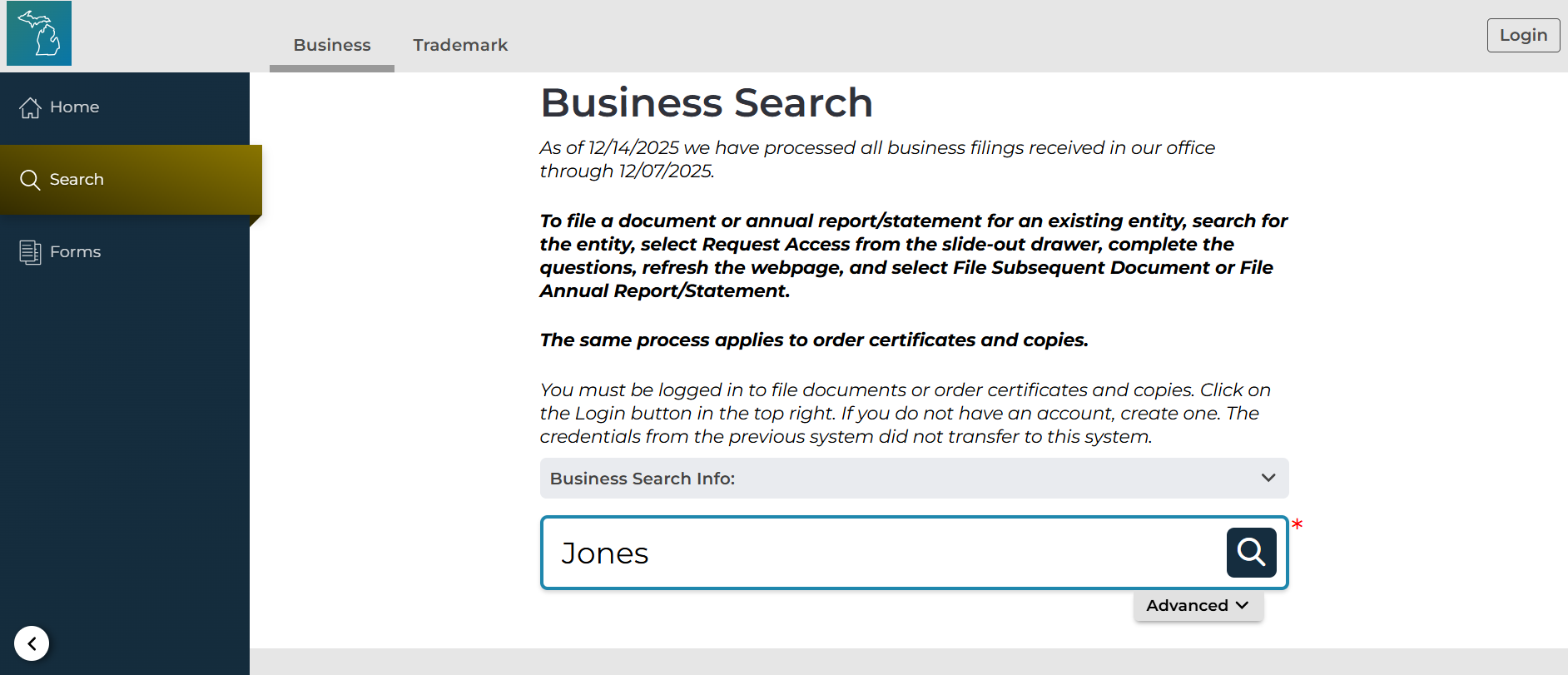
You can do a quick search by entering a name or file number, or you can use the advanced search to search by:
- Name or filing number
- Individual name
- Resident agent name
- Corporation card file
You can also use the advanced search features to filter by:
- Entity type
- Current status
- Registration start and end date.
The advanced search tools also include features so that you can check name availability or search for partial names if you are unclear on the exact legal name of the LLC.
3. Use quick search tips to get accurate results
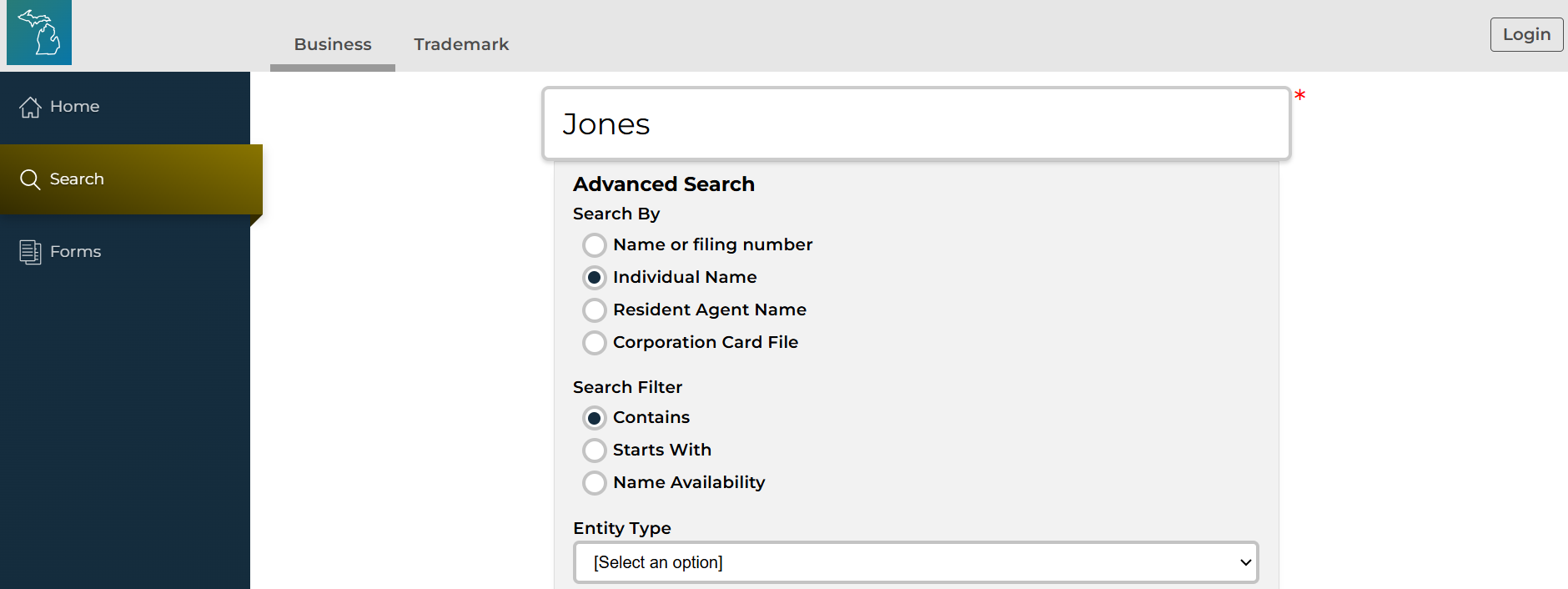
If your first search doesn’t return what you expect, try these tips:
- Remove punctuation and special characters
- Try “LLC” and “L.L.C.”, or search without either
- Try both singular and plural versions
- Search for just the core keyword in the business name
- Use the entity number when available
4. Open a result and read the key fields
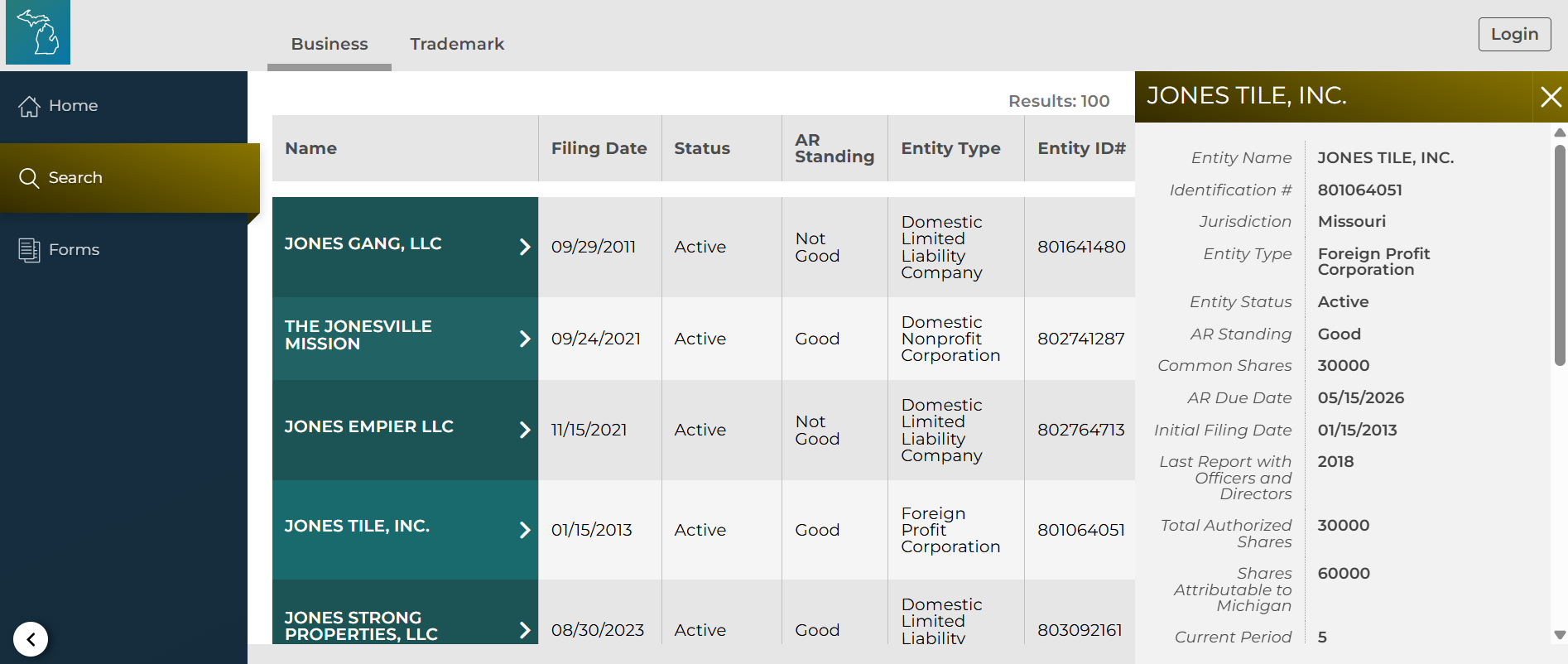
The search page will provide several key pieces of information, including:
- The full business name
- Filing date
- Status
- Accounts receivable status
- Entity type
- ID number
- Registered agent name
- Accounts receivable due date
For even more details, click an individual search result, which will bring up a sidebar with additional information like the registered office address and member information.
5. Check filings / PDFs for deeper details
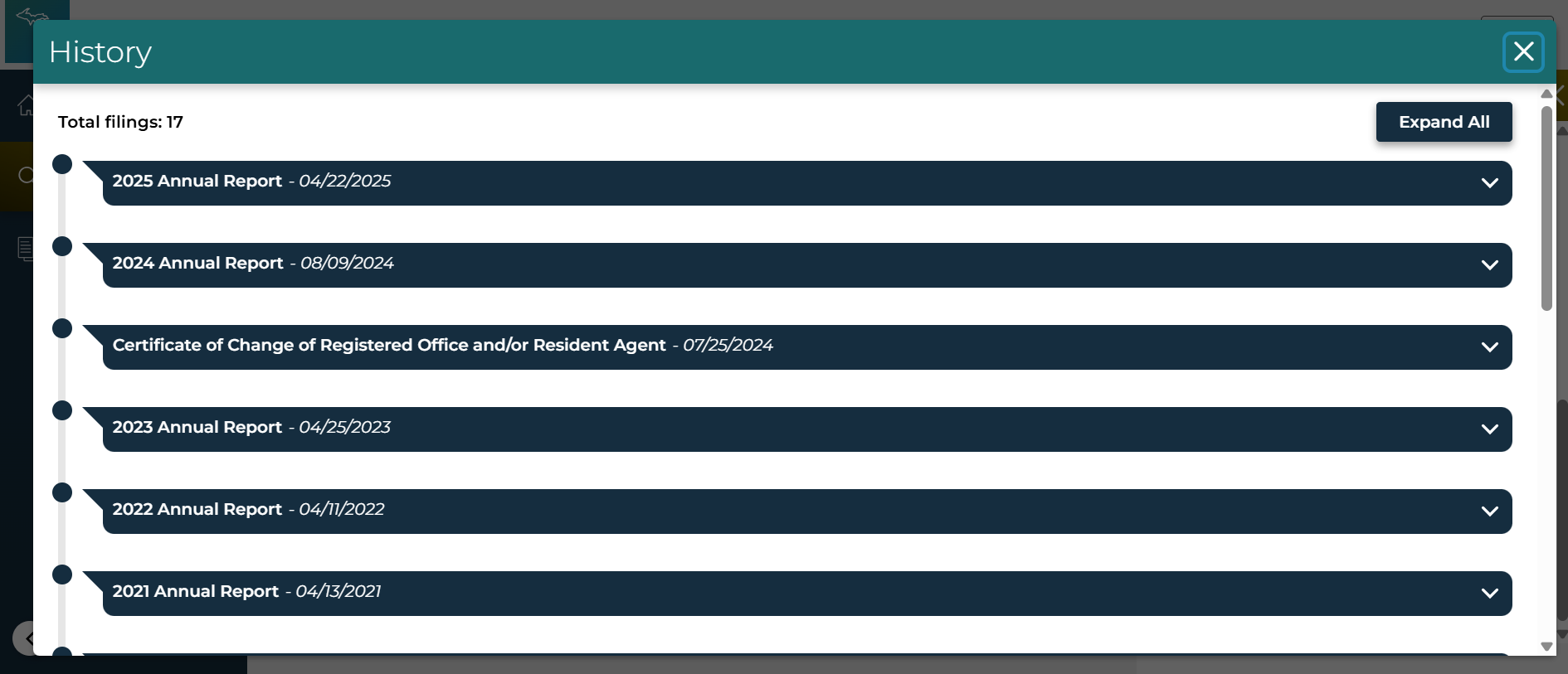
At the bottom of the sidebar containing the individual business’s details, you’ll find a “View History & Filings” button. Click this to bring up a pop-up where you can download PDF images of important filings.
- Check the Articles of Organization to learn more about organizers, members, and the business’s initial management structure.
- View amendments to learn about name or manager changes.
- Check annual reports or statements of information to discover who the current managers or governing persons are.
Ownership and management details can usually be found in filings, but remember: Michigan does not have a requirement to show ownership information, which means these details usually aren’t provided.
How to verify an LLC is legit in Michigan
If you’re using Michigan’s LLC lookup to protect yourself or your business, use the verification steps below to make sure a business is legitimate.
Confirm the LLC exists in Michigan
Find the business in the official Michigan database. If no record exists in the claimed formation or registration state, that’s a major red flag. Foreign LLCs registered to do business in Michigan should still appear.
Check the LLC’s status
Review the status and accounts receivable standing fields carefully, and rely on Michigan’s terminology to understand a business’s current status. “Active” or “good” statuses are generally safe, but terms such as “not good,” “dissolved – operation of law,” or “dissolved – certificate of dissolution” signal problems. Dissolutions signal that the business either voluntarily dissolved or lost its incorporated status due to failing to file annual reports and other essential documents. “Not good” in the accounts receivable field signals poor financial health.
Match the registered agent and details
Compare the registered agent name and address to the information provided on contracts, invoices, or onboarding documents. Mismatches should be questioned.
Confirm good standing or order proof
If proof is required, Michigan allows businesses to request an official certificate (often called a Certificate of Good Standing or Certificate of Existence). To order certificates, you must create an account and make sure you’re logged in to the MIBusiness Registry Portal.
If the LLC is delinquent, reinstatement and overdue filings may restore eligibility.
Red flags in Michigan
Watch for these warning signs:
- No record appears in Michigan
- Status shows dissolved, revoked, forfeited, or inactive
- Registered agent or address doesn’t match the provided information
- The LLC is not in good standing due to overdue filings
- Refusal to provide a certificate when one is reasonably required
What to do after your Michigan LLC lookup
Your next steps will depend on why you ran the search. Are you vetting a Michigan business or starting one?
If you’re vetting a business in Michigan
After confirming the record:
- Save or download the LLC record for your files.
- Order a Certificate of Good Standing if a bank, vendor, or contract requires it.
- Verify any required local licenses if the industry or municipality requires them.
- For larger transactions, consider checking UCC liens or other public filings tied to the business name in Michigan.
If you’re starting an LLC in Michigan
Follow these steps:
- Run a formal name search and confirm compliance with Michigan naming rules.
- Choose a registered agent who meets Michigan requirements.
- File your Articles of Organization in Michigan once the name is clear.
- Set reminders for Michigan annual or biennial reports and any state tax deadlines to ensure that you stay compliant.
Conclusion
An LLC lookup is one of the easiest ways to confirm whether a business is legitimate and compliant in Michigan. By searching the state’s official database, reviewing status and filings, and verifying good standing when needed, you can protect yourself before money or contracts are involved.
Whether you’re vetting a business or preparing to form your own LLC in the Great Lakes State, a quick lookup can save time, money, and unnecessary risk.
FAQ
Yes. Michigan’s business entity search is free and available to the public.
Michigan does not always list owners directly. Manager or governing information may appear in filed documents rather than the summary record.
Yes. LLCs formed in other states but registered to do business in Michigan should appear in the database.
For accuracy, always verify LLC information directly through Michigan’s official database.