


You’re excited to launch your LLC in Texas and make your entrepreneurial dreams come true, or, perhaps, you want to learn more about an existing LLC. Either way, you can find the information you need: simply complete an LLC lookup, using official resources from the state of Texas.
All the details you need are readily available online. The Office of the Secretary of State provides a convenient online business service known as SOSDirect, which allows you to complete straightforward searches within an official database. Completed within this system, an LLC lookup helps you learn about local businesses or take the next steps in forming a business of your own.
Not sure where to start? We’re here to help. In a few minutes, you’ll know exactly how to find and read an LLC record in Texas.
Why you might need an LLC lookup in Texas
People search for Texas LLC information to check name availability before forming a business and to verify details before contracts or financial arrangements. An LLC lookup provide clarity and peace of mind for both aspiring entrepreneurs and anyone engaging with an existing company.
What an LLC lookup is
An LLC lookup involves a thorough search of the official Texas business entity search database, with the goal of confirming that the business in question is properly registered with the state. This is the most reliable public process for verifying business legitimacy in the state of Texas.
What an LLC lookup helps you confirm
First and foremost, a Texas LLC lookup verifies official registration (or lack thereof) with the Texas Secretary of State. This search shows that a particular business exists in Texas and that it is properly registered with the state. This also helps you learn about the details that confirm the LLC is in good standing such as the registered agent and the filing history.
Common reasons people run an LLC lookup in Texas
An LLC lookup provides basic information about Texas businesses, but why that information is required, and how that information is used, can vary greatly from one search to the next. Typical reasons for running a Texas LLC lookup include:
- Verifying companies. Before you sign a new contract or pay an invoice to an unfamiliar business, use the LLC lookup process to learn more about the business in question.
- Learning about new vendors or clients. Gain peace of mind as you prepare to work with new vendors, clients, or partners; use LLC lookup tools to confirm basic details about these businesses.
- Confirming your own LLC’s status. Learn about name availability as you prepare to launch an LLC, and continue to keep tabs on your business through ongoing LLC searches.
What you can find in a Texas LLC lookup
A Texas LLC lookup can provide helpful information about local businesses: their names (official and assumed), where they’re located, and even the names of the LLC managers. Together, these details reveal the big picture of the LLC and its status. During this search, the most readily available information will include the business name, the filing number, the entity type, and the entity status.
Conducting an LLC search in Texas: step-by-step guide with tips
In Texas, the LLC lookup process involves a few simple, but important steps that must be completed to secure access to LLC information.
1. Go to the official Texas LLC search portal
Begin by visiting the SOSDirect website. This should be your go-to resource for information about Texas businesses, especially when checking name availability or reviewing Secretary of State records. You can also use the Texas Comptroller’s Taxable Entity Search, which allows you to look up Texas taxable entities and verify basic business information.
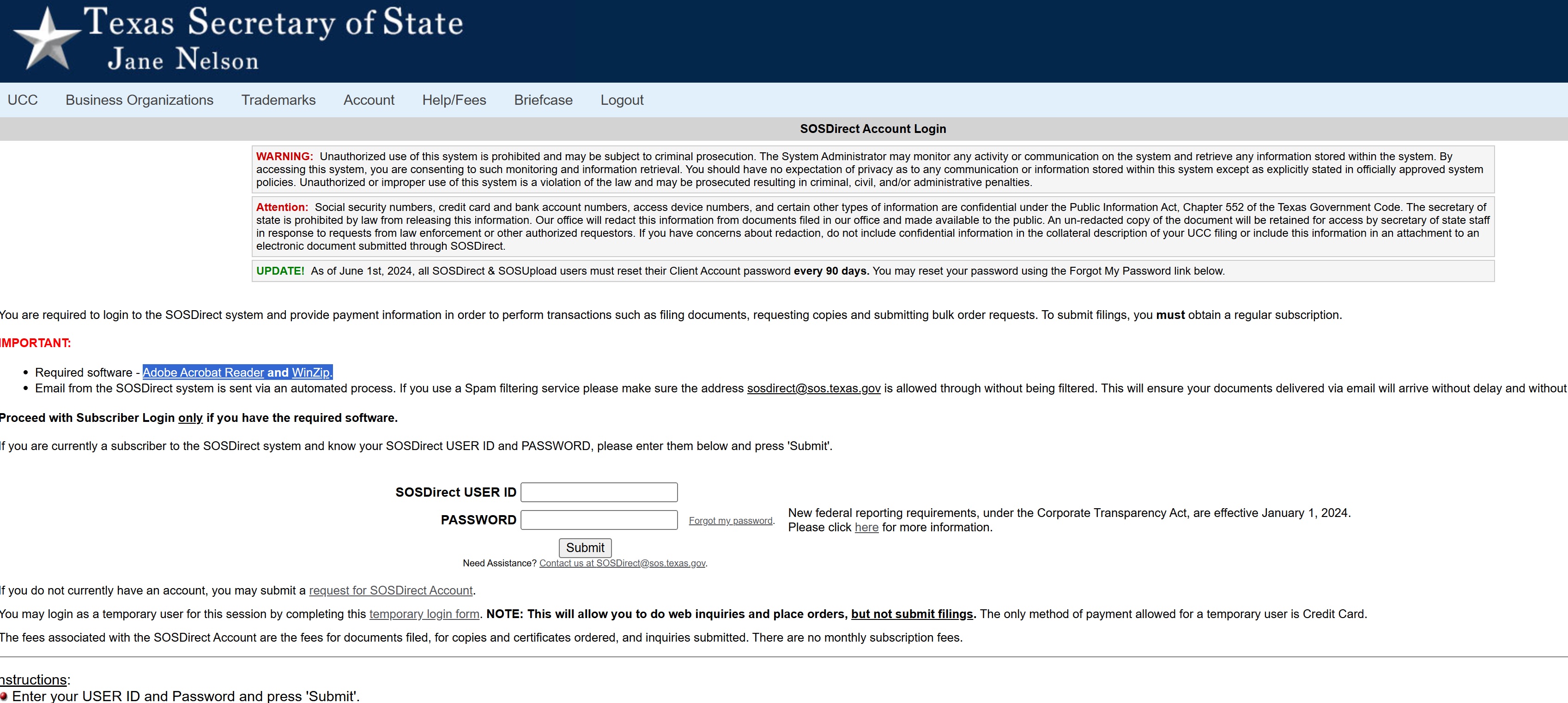
Required software for using SOSDirect services includes Adobe Acrobat Reader and WinZip. Enter contact information and credit card details when prompted. While you do not necessarily need to fund your client account, your credit card will be used for verification purposes.
Read and accept the terms of use agreement, which includes important details about fees and prohibited behaviors. If you are assigned a session code, make note of it so you can easily check status or retrieve orders later on.
2. Choose the best search method
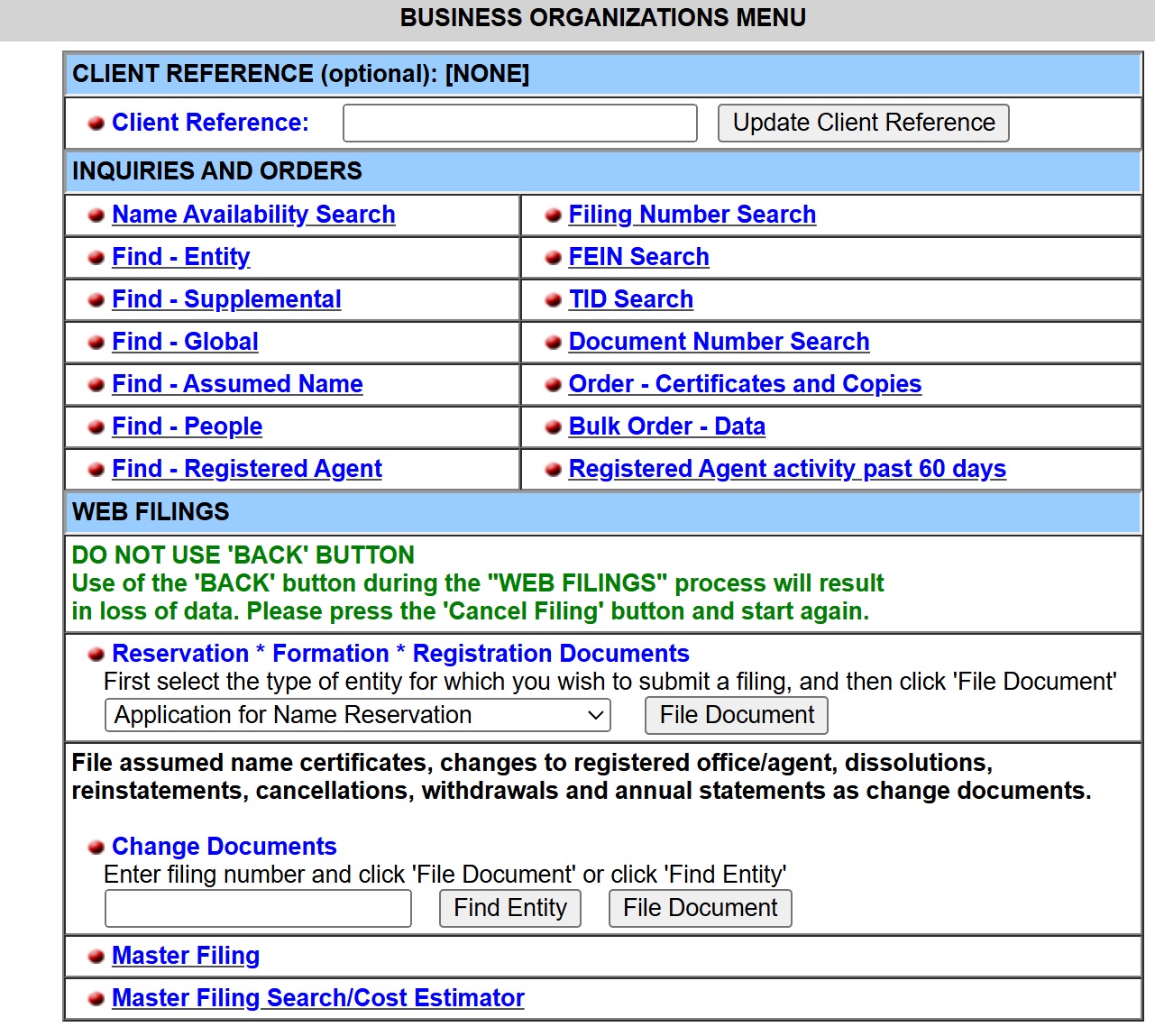
Once you’ve been approved to enter the SOSDirect portal, you can conduct your preferred search, using the blue navigation bar near the top of the page. Top options include:
- Name Availability
- Assumed Name
- Registered Agent
Follow website prompts when conducting searches and be sure to check the bottom of the page for definitions when relevant. Keep in mind that, for each search, a $1 statutorily authorized fee will be assessed.
3. Use quick search tips to get accurate results
The right search strategy can improve results, expediting the overall search process and allowing you to pay fewer search fees. Generally speaking, specificity is better.
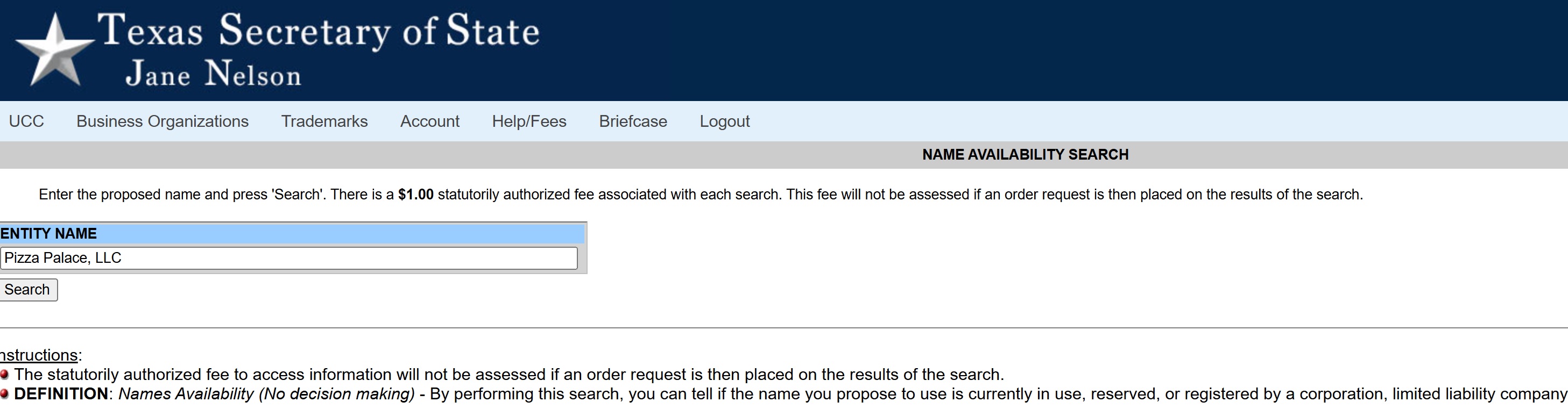
Use these best practices to improve search results:
- Remove punctuation and special characters
- Try “LLC” vs “L.L.C.”
- Try singular/plural versions
- Search only the core keyword
- Use the entity number when available
4. Open a result and read the key fields
Your search should produce a list of businesses, along with basic information about the entity type (LLC or domestic for-profit corporation, for example), along with entity status (such as “in existence”) and name type (legal or fictitious).
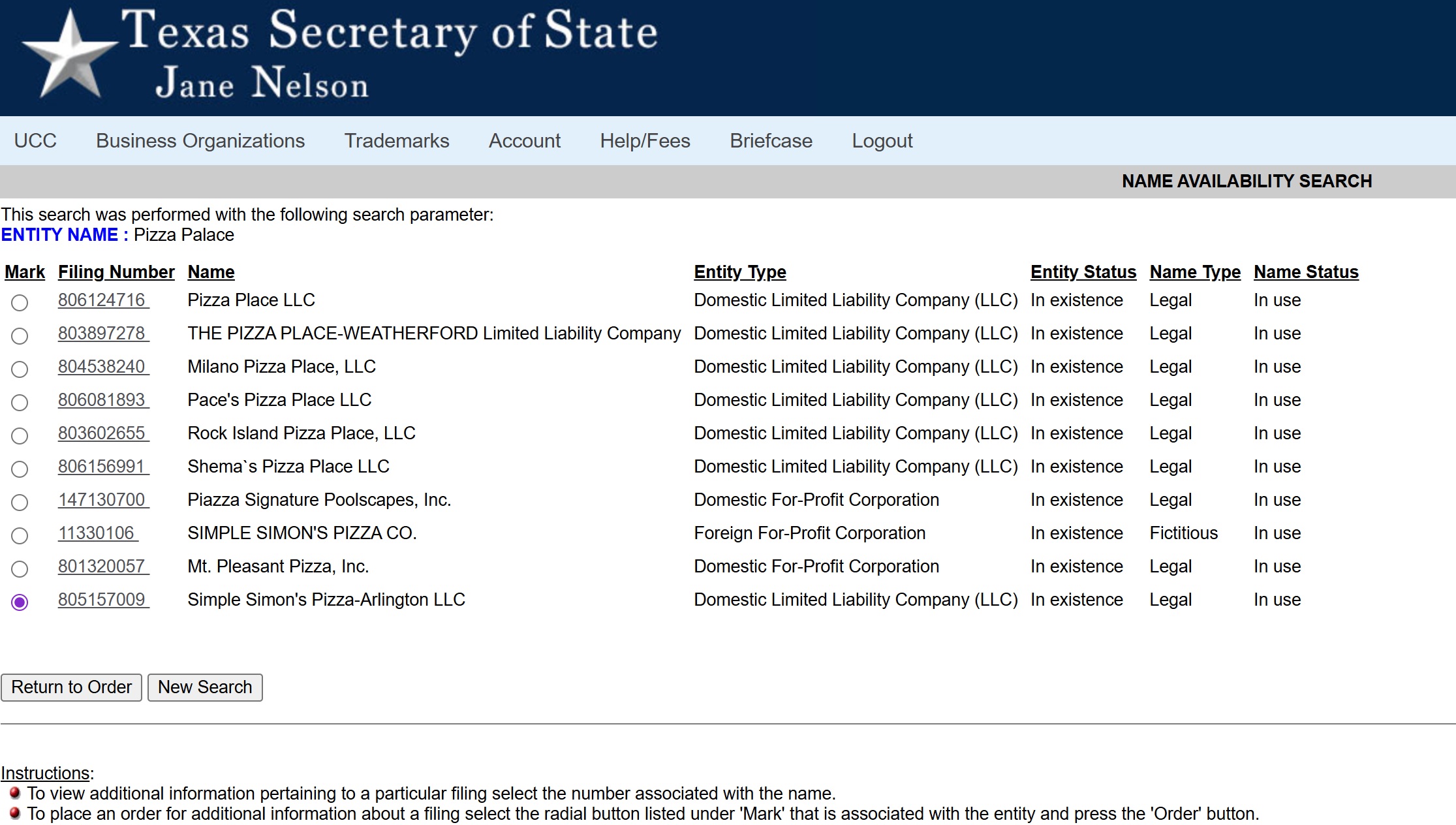
If you find a business of interest during your search, you can click the filing number associated with the business name to learn even more. Before you get lost in the details, scan results for the most important information:
- Status. The initial search should reveal both entity status and name status. This information will also be displayed near the filing number and date of filing on the “view entity” page for the business organization inquiry.
- Registered agent. Near the bottom of the “view entity” page, you’ll find a section for viewing additional information about the LLC. Click “registered agent” on the left-hand side of this box to see the name and address of the LLC’s registered agent.
- Filing date. The original date of filing should be listed near the filing number in the upper left corner of the “view entity” page. This represents the date on which the LLC originally filed the Certificate of Formation, the foundational document for setting up an LLC in the state of Texas.
Remember: an LLC can be active but not in good standing, especially if that LLC owes fees or has failed to complete necessary filings on time.
5. Check filings or documents for deeper details
By now, you should have a basic idea about the LLC in question: whether it’s active, where it’s located, and whether a particular business name is currently being used. There’s still more to learn, however, and search results on SOSDirect may only produce surface-level information.
Good news: in addition to confirming details such as the business name, address, or registered agent, you can view PDFs for various filings. Visit the filing history section and, for available documents, click “view image” on the left side. This will lead to a PDF file.
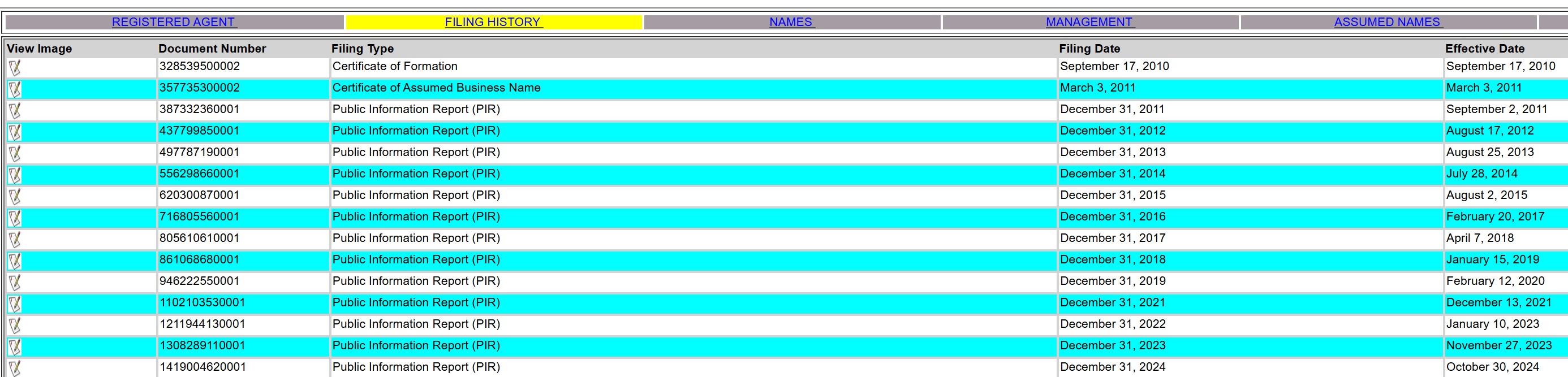
Available files will vary from one business to the next, but, in general, it’s advisable to view these forms:
- Certificate of Formation. This foundational document should clearly outline the original name of the business, the type of entity, and details about the initial registered agent.
- Certificate of Assumed Business Name. As the Texas equivalent of “doing business as” (DBA), the assumed name must be formally registered. This document should highlight the legal name, the assumed name, and the type of entity.
- Public Information Report. Meant to satisfy tax filing requirements in Texas, the Public Information Report (PIR) must be filed annually by any LLC organized (or with nexus) in the state of Texas.
Feel free to also order available documents through the SOSDirect portal. Although requested via SOSDirect, these orders will be sent via email. Options include:
- Certificate of Fact. This officially verifies the legal status of the business in question. A copy of the Certificate of Fact costs $15 and is sent digitally. This will feature the seal of the state of Texas along with a digitized signature of the Secretary of State.
- Plain or certified copies of documents. SOSDirect offers access to official documents such as the Certificate of Formation or various Public Information Reports. Plain copies cost 10 cents per page. Certified copies cost $15 for the certification and an additional $1.00 per page.
Once your order has been processed, you will be notified by email. At that point, you can access the file in your SOSDirect briefcase. You can access the briefcase from the light blue search bar near the top of the page.
How to verify an LLC is legit in Texas
If your LLC lookup involves state-specific verification, follow these steps to confirm that the business is legitimate.
- Confirm the LLC exists in Texas. A valid search result should confirm the existence of the LLC in question. Consider it a warning sign if the search fails to produce any record of a given LLC.
- Check the LLC’s status. Confirm that the LLC is listed as “in existence.” This information should be listed in the “entity status” section.
- Match the registered agent and details. Verify that the registered agent name and address match the details the business provided on contracts, invoices, and onboarding documents.
- Confirm good standing. For more details about the LLC’s status, order a Certificate of Fact.
As you search for the details highlighted above, be mindful of these red flags:
- No record appears in Texas.
- Status is not listed as “in existence.”
- Inability to obtain a Certificate of Fact.
- The filing history section includes tax forfeitures.
What to do after your Texas LLC lookup
How you proceed after searching for LLC details depends on why you performed the lookup in the first place: is this part of the LLC formation process or strictly focused on vetting?
If you’re vetting a business in Texas
- Visit the “view entity” page for details about the registered agent of the LLC status.
- View PDFs for available documents such as the Certificate of Formation.
- Order a Certificate of Fact or other certified documents if required by banks or vendors.
- Verify required local licenses relevant to the industry or city in question.
- Consider checking Uniform Commercial Code (UCC) information via the SOS UCC portal.
If you’re starting an LLC in Texas
- Run a formal name search and verify compliance with Texas naming requirements.
- Choose a registered agent with a physical presence in the state of Texas.
- File the Certificate of Formation.
- Set alerts for filing Public Information Reports and fulfilling other annual requirements.
Conclusion
Perform a Texas LLC lookup to confirm business legitimacy or compliance. This is your best bet for finding the right LLC name, and it’s a great option for vetting other businesses as well. Use this simple strategy to verify LLC status before signing contracts or moving forward with the LLC formation process.
FAQ
Use the SOSDirect portal to search for registered business entities and their official names.
It is free to create an account to access the SOSDirect portal. The Secretary of State assesses a $1 fee for every search query. You can also order Certificates of Fact for $15 each or information letters for $5.
If you need extra assistance while navigating the LLC lookup process via SOSDirect, email [email protected] or call (512) 475-2755.