

Bookkeeping is part of all small business operations, but only some can afford a full-time accountant. For many business owners, that means maintaining their accounts, taking up hours of their precious time.
Accounting software is an affordable solution.
It helps you track your cash flow (how money moves in and out of your business) and provides an easy-to-understand overview of your financial health.
But with a packed accounting software landscape to choose from and too few spare hours in the day, researching the best accounting software can be a pain.
We know that research is a huge part of making the first steps in building your business.
To save you time and make life easier, we’ve selected the 11 best accounting software for small businesses, including cost, capabilities, and industry suitability.
What type of accounting is best for small businesses?
The best accounting software for any small business must suit its operational needs, be easy to use, and support growth.
For example, a restaurant owner wouldn’t need the same accounting features as a freelancer. And one business might need invoicing capabilities, while another, accounting software that integrates with their payroll or point-of-sale system.
But all accounting software should help small business owners track their cash flow, provide a clear picture of profitability, and ensure they’re ready for tax season.
With those essential points in mind, let’s dive in:
11 Best Accounting Software for Small Business 2026
- Zoho Books
- Wave
- OneUp
- Kashoo
- Intuit QuickBooks Online
- Xero
- FreshBooks
- Sage 50cloud
- Neat
- Marginedge
- Tipalti
1. Zoho Books
Best for ease of use and mobile accounting

Pricing: Starts at $20.00 per month
- Businesses earning less than $50,000 per year in revenue can use the Zoho Books free plan
Why we like it:
Zoho Books is an online integrated bookkeeping accounting software that connects with Zoho apps and third-party systems, such as your e-commerce platform, bank account, accounts payable and receivable, and payment processor.
The software is fast, reliable, and convenient for business owners that need to see their finances in real-time or manage inventory.
Zoho books also offer many other features that meet most small business needs at an affordable price.
Pros:
- Handy mobile app for accounting tasks
- Powerful free version
- Cheaper than comparative accounting software solutions
- Top tier plan offers multi-currency capabilities
- Advanced features like time tracking and project accounting
- Integrates with most other software solutions
- Offers extra features compared to other solutions for a similar price
Cons:
- Some advanced features like workflow automation and project tracking cost extra
- Doesn’t track fixed physical assets like equipment, real estate, or land
- Limited users with each price tier
- Charges extra to add additional users
- With so many features, new users might find it overwhelming
Who should use it:
Perfect for service-based businesses and any entrepreneurs already using other Zoho products.
2. Wave
Best free accounting software

Pricing: Free
Why we like it:
Wave offers a free, user-friendly dashboard with features that rival many paid accounting software systems.
The software includes invoicing, expense tracking and management, bank reconciliation, and double-entry accounting.
Double-entry accounting benefits entrepreneurs who run multiple businesses, as it enables you to track finances in a more structured and accurate way.
Wave also allows accountants to access reports and help prepare tax returns.
Pros:
- Free plan available
- Double-entry accounting capabilities
- Multi business management
- Unlimited invoices with customizable templates and payment acceptance
- Mobile invoicing app
Cons:
- No phone support
- Payroll and some features are only available as paid add-ons
- Limited advanced accounting features compared to paid tools
Who should use it:
Suits freelancers, consultants, and small businesses with few employees.
3. OneUp
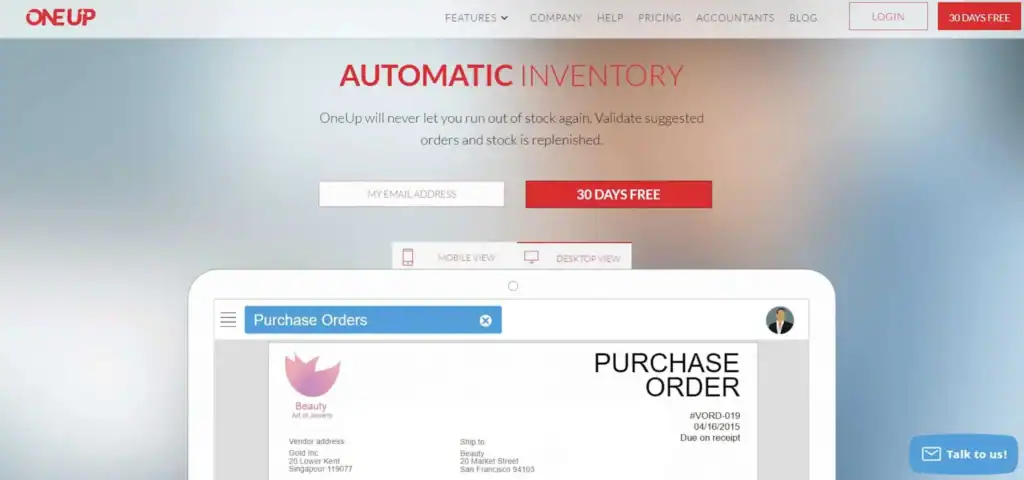
Best for inventory management
Pricing: Starts at $9 per month
Why we like it:
OneUp is a digital bookkeeping system that uses algorithms to learn and grow with your business by analyzing your inputs and transactions.
The software then streamlines your accounting process by suggesting reconciliations and automating tasks. Each time you approve a suggestion, it validates OneUp’s algorithms, increasing its accuracy to meet your accounting needs.
OneUp also matches bank transactions with invoices, enabling you to control your cash flow, which every small business needs.
Pros:
- Easy to set up
- Includes a CRM function
- Connects your banking transaction for seamless bookkeeping
- Strong inventory management features
Cons:
- No payroll or time-tracking capabilities
- Higher-tier plans, like the unlimited user option, can get expensive
Who should use it:
Suits sales teams that use customer relationship management (CRM) features to connect with customers.
4. Kashoo
Best for start-ups and businesses that need simple accounting solutions

Pricing: Starts at around $30 per month (free trial available)
Why we like it:
Kashoo’s accounting software focuses on simplicity, helping small business owners manage their books without a steep learning curve.
The platform automates key tasks like transaction categorization, invoicing, and sales tax tracking, helping streamline day-to-day bookkeeping.
By handling the basics well, Kashoo saves time and reduces the need for manual data entry.
Pros:
- User-friendly
- Unlimited users
- Excellent customer support
- Automats administrative tasks
- Includes payroll capability
Cons:
- No mobile app
- Lacks integration options
- No time-tracking, inventory, or advanced features
Who should use it:
Great for new business owners who need a simple bookkeeping solution and affordable plans that grow with their business.
5. Intuit QuickBooks Online
Best overall accounting software

Pricing: Starts at $38 per month (often discounted for the first few months)
Why we like it:
QuickBooks Online accounting software provides everything a small business needs to control its bookkeeping and run efficiently.
The QuickBooks easy-to-use dashboard and intuitive reporting make life simple for business owners new to online accounting software.
All plans include core features like income and expense tracking, mileage tracking, 1099 contractor management, and tax reporting. Higher-tier plans add extras such as inventory tracking, more user access, and advanced reporting.
And there’s a ton of free online forums and training courses to support you.
Pros:
- Phone and chat support available
- Inventory management available on higher-tier plans
- Double-entry accounting
- Integrates with many third-party apps
- Large knowledge base with tutorials and resources
- Mileage tracking
- Mobile app access
Cons:
- More expensive than many alternatives
- Limited users on lower-tier plans
- Advanced features can take time to learn
- Payroll is a paid add-on
- E-commerce integrations may require third-party apps
Who should use it:
A strong option for small businesses and freelancers that want an all-in-one accounting solution with room to scale.
6. Xero
Best for mobile and advanced features
Pricing: Starts at $25 per month
Why we like it:
Xero accounting software suits small businesses that need ease of use and mobile ability.
The software has an intuitive interface that handles most accounting tasks, such as billing and invoicing, expense tracking, sales tax calculation, custom invoices, inventory tracking, and payroll.
You can also sync Xero with multiple devices and receive real-time reports, ensuring you have up-to-date bookkeeping information when and where you need it.
Pros:
- Unlimited users on all plans
- All plans include Hubdoc receipts and bills automation
- Fixed assets management
- Reliable project tracking
Cons:
- No direct phone support
- Some features, like project tracking, require higher-tier plans
- Payment integrations may not suit all providers
Who should use it:
Suits small business owners who want user-friendly accounting software with more advanced features and flexible user access.
7. FreshBooks
Best for ease of use and customer support

Pricing: Starts at $23 per month (often discounted for the first few months)
Why we like it:
FreshBooks accounting software is designed to make small business accounting and invoicing simple and efficient.
The platform focuses heavily on invoicing, making it a good fit for service-based businesses that need to track time, bill clients, and get paid quickly.
FreshBooks also covers basic bookkeeping needs, integrates with third-party apps, offers automatic backups, and works across desktop and mobile devices.
It also includes features like invoice tracking, so you can see when clients open your invoices.
Pros:
- Excellent customer support
- Easy to use
- Numerous cloud accounting features
- Time and mileage tracking in all plans
- Works on Android and iOS apps
Cons:
- Limits users and billable clients on lower-tier plans
- No built-in quarterly tax estimation tools
- Some features, like bank reconciliation and accountant access, require higher-tier plans
- Limited document management features
- Payroll is only available as a paid add-on
Who should use it:
Suits small service-based business owners who send or receive multiple invoices, need easy-to-use accounting software, and efficient customer service.
8. Sage 50cloud
Best for customization and growth

Pricing: Starts at $124 per month
Why we like it:
Sage 50cloud Accounting is a cloud-based accounting software system that offers advanced features and customization options, including invoicing, expense management, and inventory tracking.
The accounting software integrates with Microsoft Office and enables multiple company account management to help small business owners run and grow their businesses.
Pros:
- Many customization options
- Inventory tracking tools
- Microsoft 365 integration
- Cloud-based
- Multiple currency support
- Automatic bank reconciliation
Cons:
- No dedicated mobile app
- Interface can feel outdated compared to newer tools
- Steeper learning curve than simpler platforms
- Payroll is available but requires an additional subscription
- Limited flexibility compared to fully cloud-based tools
Who should use it:
A good option for start-ups and micro-businesses that need accounting software with affordable upgrade options.
9. Neat
Best for freelancers and micro businesses

Pricing: $200 per year
Why we like it:
Neat is designed to keep bookkeeping simple, making it a practical option for self-employed entrepreneurs.
The platform focuses on expense tracking and document management, helping users organize receipts, categorize transactions, and stay prepared for tax season.
It also provides basic reporting and allows you to manage invoices and payments in one place.
Pros:
- Expense tracking included
- Unlimited file storage
- Document search and filtering features
- Chat and email support
- Accountant file sharing
Cons:
- No payroll option
- Some features, like advanced reporting or invoicing, may require add-ons
- No monthly billing option
Who should use it:
Suits self-employed entrepreneurs, freelancers, and micro business owners.
10. Marginedge
Best for restaurants

Pricing: $350 per month
- No free trial, but you can request a demo before buying
Why we like it:
MarginEdge is designed specifically for restaurants and food-based businesses like cafes, bars, and food trucks.
It integrates with point-of-sale (POS) systems to automatically import sales data and help track margins in real time.
The platform also provides detailed food usage and recipe costing reports, helping reduce waste and improve profitability.
Pros:
- No contract needed
- Integrates with most POS systems
- Includes bill pay
- Provides food usage reports and recipe costs
Cons:
- Only suits food-industry businesses
- Doesn’t include payroll
Who should use it:
A tasty option for restaurant owners and other food business entrepreneurs who need to track costs and reduce food waste.
11. Tipalti
Best for deadline-driven businesses
Pricing: Starts at $99 per month (custom pricing for higher tiers)
Why we like it:
Tipalti is a cloud-based platform focused on automating accounts payable for businesses that work with multiple partners, such as vendors, suppliers, affiliates, and freelancers.
It helps streamline payment workflows, manage approvals, and send payments in multiple currencies across many countries.
The platform also supports tax compliance features, helping businesses handle reporting and documentation more efficiently.
Pros:
- Relatively quick to set up
- Reliable customer support
- Supports multiple payment methods and currencies
Cons:
- Interface can feel complex
- Limited flexibility when customizing reports
- More focused on payments than full accounting featuresports
Who should use it:
Suits businesses that manage high volumes of payments across multiple countries and need a more automated way to handle accounts payable and compliance.
Conclusion
No two businesses are alike and most need specific accounting solutions that suit their daily operations.
And while many accounting software services overlap, some provide solutions more suited to one small business than another.
So, before investing in any accounting system, know what you need, ensure it can provide, and take advantage of any free trials.