


Whether you’re preparing to sign a contract with a new vendor, onboard a business partner, or confirm your own LLC is still in good standing, an Wisconsin LLC lookup takes just a few minutes and can save you from serious headaches down the road. The Badger State makes this process straightforward through a free, publicly accessible database. However, knowing what to look for once you’re inside the system is still important if you want to make the process as smooth and hassle-free as possible.
This guide walks you through the entire process, from finding the right portal to running your search to reading the results and taking action based on what you find.
Why you might need an LLC lookup in Wisconsin
Before diving into the steps, it helps to understand why people run these searches in the first place.
What an LLC lookup is
An LLC lookup means searching Wisconsin’s official business entity database to find a company’s legal registration record. Because every LLC formed in Wisconsin is required to file with the state, this database is the most reliable public source for confirming whether an LLC actually exists and is legally active.
What an LLC lookup helps you confirm
A single lookup can tell you a lot about a Wisconsin LLC, including:
- The official status of the LLC (whether it is active, dissolved, or revoked)
- The registered agent’s name and address of record
- The LLC’s formation date and jurisdiction (domestic Wisconsin LLC vs. foreign entity LLC registered here)
- Filing history, including documents that may name the organizers, managers, or governing persons
- Whether the business is current on its required filings
It is worth noting that Wisconsin does not prominently display member or ownership information on the summary screen. Ownership details, when available, typically appear inside filed documents like the articles of organization or annual reports.
Common reasons people run an LLC lookup in Wisconsin
There are a variety of real-world scenarios where this search is genuinely useful:
- Verifying a subcontractor or vendor before paying an invoice
- Confirming a potential business partner’s LLC is legitimate before signing an agreement
- Checking that your own LLC is still active and hasn’t lapsed due to a missed filing
- Confirming a business name is available before forming a new LLC in Wisconsin
What you can find in a Wisconsin LLC lookup
When you pull up an LLC record through Wisconsin’s portal, here’s what the summary typically shows:
- Legal name of the entity as registered with the state
- Entity/filing number (Wisconsin calls this the “entity ID”)
- Status (Active, Dissolved, Revoked, etc.)
- Formation date and jurisdiction (domestic or foreign)
- Registered agent name and registered office address
- Principal office address, if provided
- Filing history, with links to downloadable documents
If you need manager or organizer details, you’ll usually need to open the actual filed documents rather than relying on the summary screen alone.
Conducting an LLC search in Wisconsin: step-by-step guide with tips
Wisconsin makes conducting an LLC search relatively simple and straightforward. When you’re ready to look up a Wisconsin LLC, here are the steps you should follow:
1. Go to the official Wisconsin LLC search portal
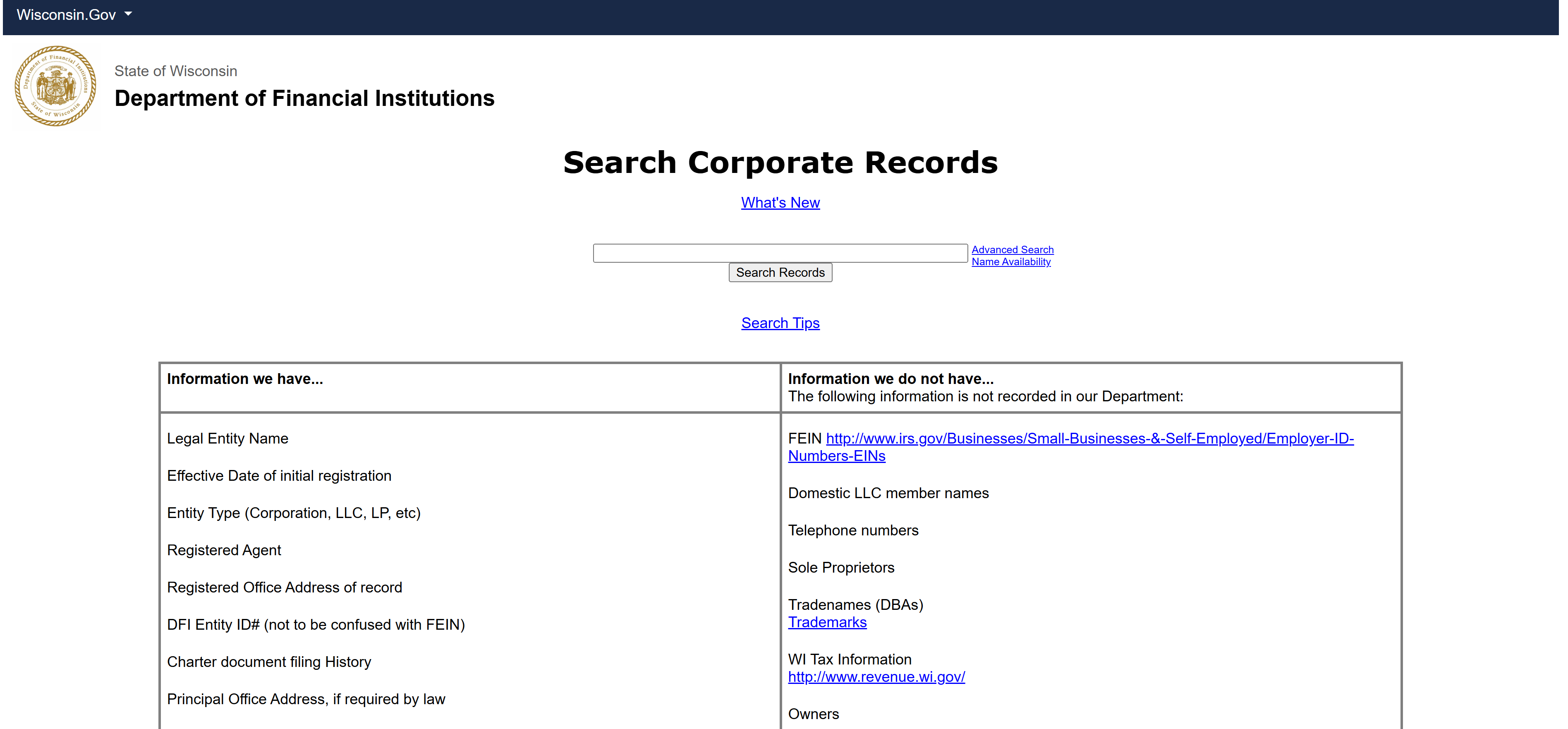
Head to the Wisconsin Department of Financial Institutions (DFI) business entity search, available on the Wisconsin Secretary of State website. This is the official state portal and the only source you should use for verification purposes.
No login or account is required to search. The portal works in most modern browsers without issue. One thing to be aware of: Wisconsin maintains a separate search for domestic (Wisconsin-formed) and foreign (out-of-state) entities, but both appear in the same general search, so you don’t need to toggle between databases for a basic lookup.
2. Choose the best search method
The Wisconsin DFI portal offers several ways to search:
- Entity name search: The most common starting point; enter the full or partial business name
- Entity ID number search: The fastest option if you already have the Wisconsin entity ID from a contract, invoice, or prior search
- Registered agent search: Useful if you’re trying to find all entities tied to a specific agent
- Principal name search: Allows searching by the name of an individual associated with the filing
For most lookups, start with the entity name. If you’re not finding results, the entity ID search will cut through any spelling or formatting issues immediately.
3. Use quick search tips to get accurate results
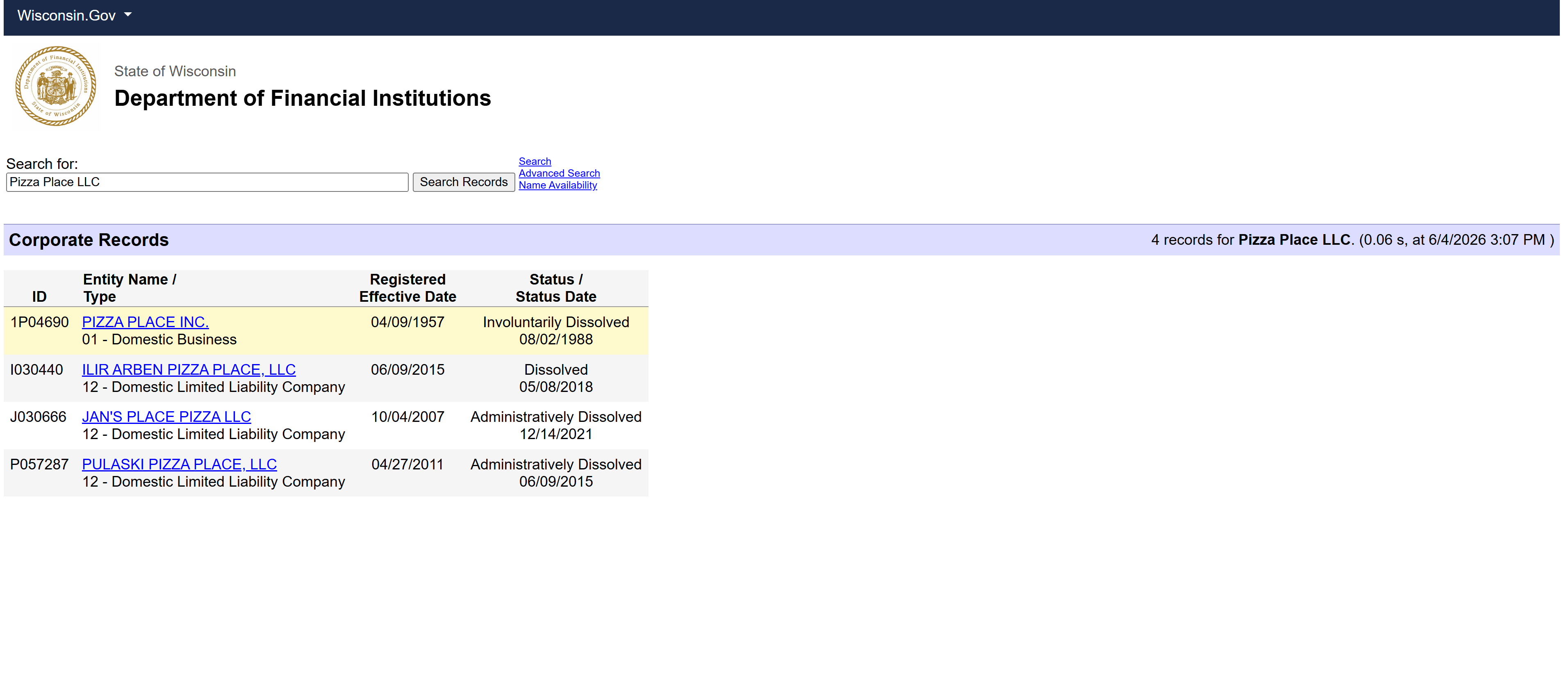
Wisconsin’s search portal has a few quirks worth knowing about before you start:
- Drop punctuation. Search “LLC” rather than “L.L.C.” and skip commas or periods in the name
- Try both the full name and a shortened version (e.g., “Northwoods Consulting” vs. “Northwoods Consulting Group LLC”)
- Use singular and plural variations if the exact spelling is unclear
- Search just the most distinctive keyword in the name if the full name returns too many results
- If a name search returns nothing, double-check whether the entity might be a foreign LLC registered under a slightly different name than the one it operates under locally
4. Open a result and read the key fields
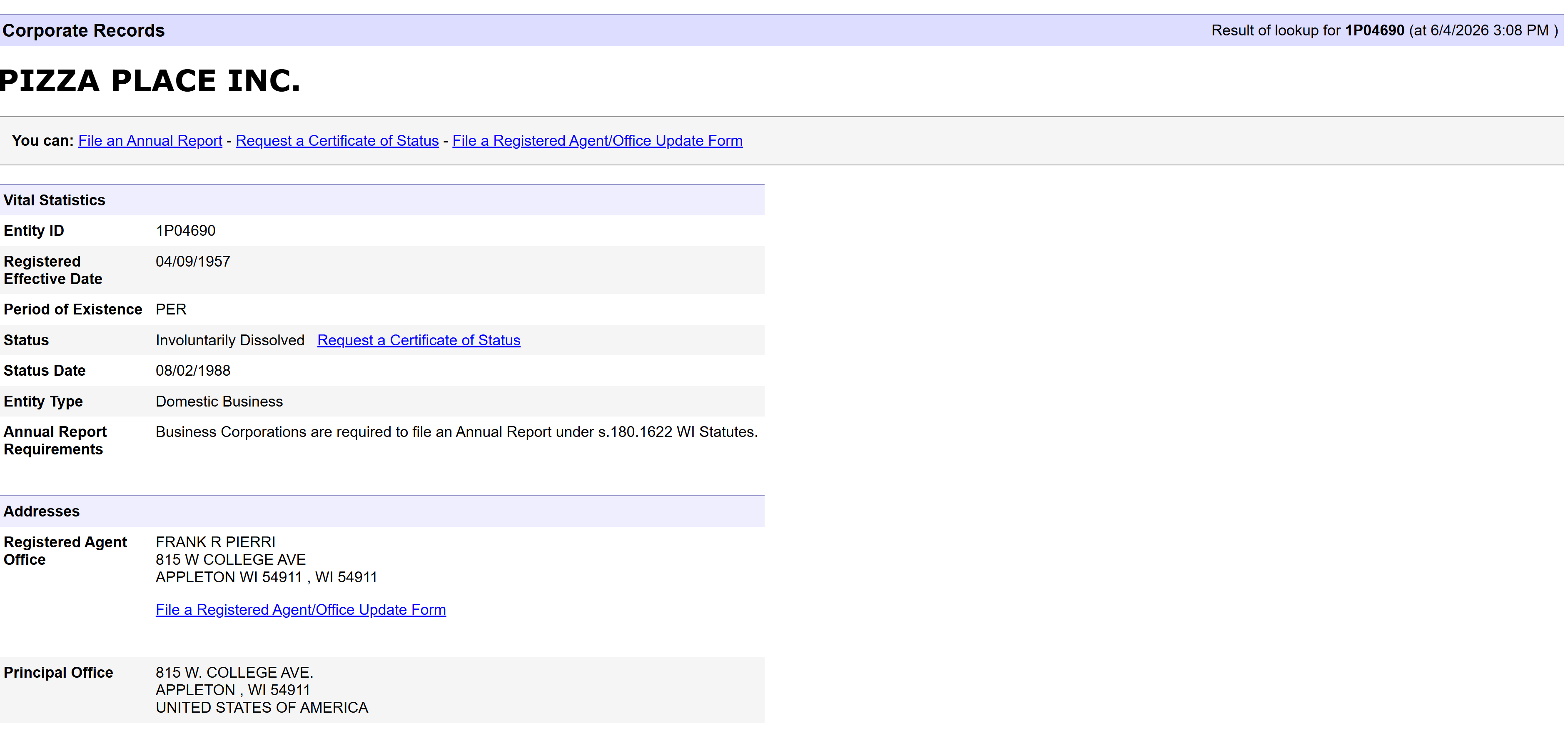
Once your search returns results, click the entity name to open the full record. The fields that matter most include:
- Status: Wisconsin uses terms like Active, Dissolved, Revoked, and Delinquent. Active is what you want. Revoked or dissolved means the LLC has lost its legal standing in the state, either voluntarily or due to noncompliance.
- Formation date and state: This tells you the date an LLC was formed as well as whether it’s a Wisconsin domestic LLC or a foreign entity registered to operate in the state.
- Registered agent: The person or company designated to receive official legal notices on behalf of the LLC.
- Principal office address: The business address on record with the state.
One important clarification: an LLC can show as Active while still being delinquent on filings or fees. Active status alone doesn’t guarantee full compliance. You’ll want to check the filing history to confirm the entity is current.
5. Check filings/PDFs for deeper details
The summary screen gives you the headline information, but the real substance is in the documents. Look for a “Filings” or “Documents” tab on the entity record and open the relevant ones:
- Articles of Organization: The formation document. Names the organizers and sometimes the initial managers or governing persons.
- Amendments: Filed when the LLC changes its name, registered agent, or management structure. Worth reviewing if the business has been around for a few years.
- Annual Reports: A Wisconsin LLC annual report is required by all WI LLCs, and these often include updated information on managers or authorized members. They’re your best source for current management details.
Don’t skip the filings tab just because the summary looks clean. Ownership and management information in Wisconsin almost always lives in these documents rather than the main record view.
How to verify an LLC is legit in Wisconsin
Before you pay an invoice, sign a deal, or onboard a new vendor, here are the steps you can follow to confirm that the LLC is legit and in good standing:
1. Confirm the LLC exists in Wisconsin. If you can’t find it at all, and the business claims to be a Wisconsin LLC, that’s a significant red flag. Foreign LLCs should also appear in the portal if they’re registered to do business here.
2. Check the status. Active means the entity is in good standing with the state. Any status showing dissolved, revoked, forfeited, or delinquent means something has gone wrong, whether from missed annual reports, unpaid fees, or a voluntary wind-down.
3. Match the registered agent and addresses. Compare the registered agent name and any address information in the DFI record to what the business provided you on contracts or onboarding forms. Discrepancies aren’t automatically disqualifying, but they do warrant further investigation.
4. Order a Certificate of Status if needed. If a bank, lender, or contractual counterparty requires formal proof of good standing, you can order a Certificate of Status through the Wisconsin DFI. This is the state’s official documentation that an LLC is active and current. If an LLC is delinquent, it will need to file overdue reports and resolve any outstanding fees before that certificate can be issued.
Red flags to watch for in any WI LLC lookup:
- No record appears in the DFI database
- Status listed as revoked, dissolved, or delinquent
- Registered agent or address doesn’t match what you were given
- The business refuses to provide a Certificate of Status when one is requested
- Filing history shows gaps or years-old last activity on a supposedly active business
What to do after your Wisconsin LLC lookup
What to do after a Wisconsin LLC lookup depends on your purpose for the search:
If you’re vetting a business in Wisconsin
Once you’ve confirmed the record looks clean:
- Save or screenshot the entity record for your files, noting the entity ID and status at the time of your search
- Order a Certificate of Status from the Wisconsin DFI if a formal document is required by a lender, contract, or compliance process
- Check for any local licensing requirements if the industry (construction, food service, etc.) or municipality adds another layer of registration
- For larger transactions or ongoing relationships, consider checking UCC lien filings through Wisconsin’s DFI to see if the business has secured creditors attached to its assets
If you’re starting an LLC in Wisconsin
If you were searching to check name availability before forming an LLC:
- Run a thorough name search and confirm the name you want complies with Wisconsin’s naming rules (it must include “LLC,” “L.L.C.,” or a similar designator and can’t be deceptively similar to an existing entity)
- Choose a registered agent who has a physical Wisconsin address and is available during normal business hours
- File your Articles of Organization with the Wisconsin DFI once your name is confirmed
- Set calendar reminders for Wisconsin’s annual report deadline and any state tax obligations to avoid falling into delinquent status yourself
Conclusion
Running an WI LLC lookup is genuinely one of the simplest due diligence steps available to anyone dealing with a business in the Badger State. A few minutes on the DFI portal can confirm whether an entity is real, active, and current on its obligations before any money changes hands or contracts get signed. Use the status field as your baseline, dig into the filings for management details, and order a Certificate of Status any time formal documentation is required.
FAQ
Yes. Searching the Wisconsin DFI business entity portal is free and requires no account or login.
A delinquent LLC has failed to file a required annual report or resolve outstanding fees with the state. The LLC still technically exists but is not in compliance, and it won’t be eligible for a Certificate of Status until the issue is resolved.
Yes. Foreign LLCs registered to operate in Wisconsin appear in the same DFI portal. Search by name or entity ID just like you would for a domestic entity.